
If you are having multi-monitors in your system, you may try disabling the “Full 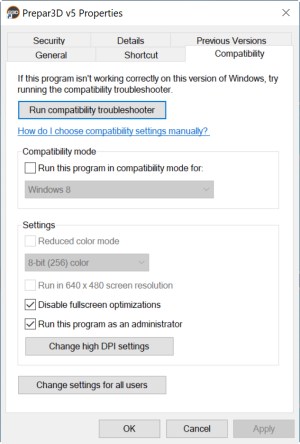 Screen Optimizations” option in your simulator. I came across this tip somewhere I found on the Internet many months ago and it said the framerate would be benefit.
I tried it on my system for a couple of weeks. Frankly, I didn’t get any noticeable difference in the areas I usually fly. But the framerate seems to be slightly higher and a bit more stable in other dense populated areas.
I can’t be 100% sure, but I found no issues from disabling the option as well. So I just leave it.
Here’s how to do it:
- Right click on the simulator icon or the program (FSX or P3D)
- Select the Compatibility Tab
- Check the box of “Disable fullscreen otpimizations”
- Click OK to save and exit
It’s as simple as that.
If you don’t like it, just uncheck it again. Even if you only have a single monitor, it still worths a try as it won’t hurt.
 FS Times
Hi Tom,
I agree that the “full screen” view eats up frame rates with multiple monitors. I’ve made the comparisons. I’m not sure that you have to go to the icon “compatibility tab” to change it, Just viewing in “window mode” and not “full screen” should do the same thing. Definitely makes a difference in frame rates with multiple monitors even though I would prefer the full view. Also, I’ve had some micro stutter problems that seem directly related to “building auto gen” settings. Shut it off and the micro stutters go away (on P3d v4). ORBX airports and major urban areas are also problematic for performance.
Ken
LikeLike
Yes, Ken. “window mode” can easily tell the difference but I prefer full screen, same to you.
BTW, how do you shut the “building auto gen” ?
Tom
LikeLike
I will have to try your suggestion as I also prefer full screen. I incorrectly thought that disabling the full screen optimizations would default back to windows mode. The “building” autogen is one of the P3D graphics sliders. Just slide all the way to the left to disable. I did the same for “vegetation” auto gen, The fluidity is more important to me than detailed scenery and it still looks good.
LikeLike
I see. Thanks. Let me know if the optimization tweak helps.
LikeLike