
If you have updated your Windows 10 to version 2004, wonder if you know the latest version has a new feature called Windows Display Driver Model (WDDM 2.7) which supports Hardware-Accelerated GPU scheduling (HAGS) function.
HAGS allows GPU to take over the video memory scheduling from CPU, so that resources are not only saved on the CPU but the latency on the graphics card will be reduced as well.
In simple English, overall performance of the graphics card is enhanced, which is a good thing as all simulators available today are CPU intensive.
A prerequisite, however, is required to activate the function — the system must have installed the latest GeForce Game Ready 451.48 driver for Nvidia card or the Adrenalin 2020 Edition 20.5.1 Beta for AMD card as well.
When above conditions are met, users could search for “Graphics settings” under Windows Settings, and then enable the feature and choose the graphics preference for the simulator (multiple platforms supported) as needed.
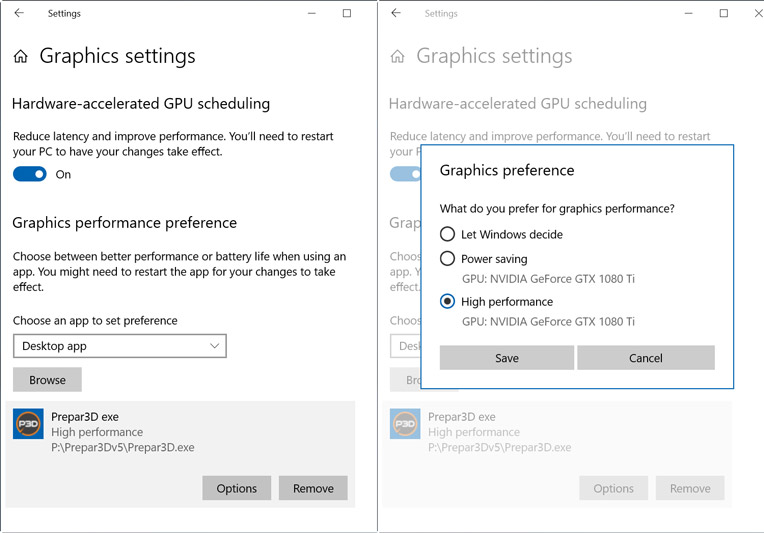
Note that there are reports saying results vary from positive to null to negative, depending on the hardware and the game.
On my system, I cannot tell if there are any differences in Prepar3D with the feature enabled. Your mileage may vary.
Anyway, I am keeping it activated as it does no harm as well. Moreover, I am hoping that it could in the end bring some improvements from future updates.
For X-Plane, I haven’t tried the feature yet as the simulator is on another computer which hasn’t been ready for the Windows 10 2004 update.
 FS Times
Tom, Thanks for the tip. I run 3 monitors and, like others, I get micro stutters in urban areas (using ORBX), especially in turns, even with good frame rates. It’s quite subjective, but I’d have to say that the micro stutters are less pronounced with “high performance” activated.
Ken
LikeLike
Glad to hear that.
Tom
LikeLike