
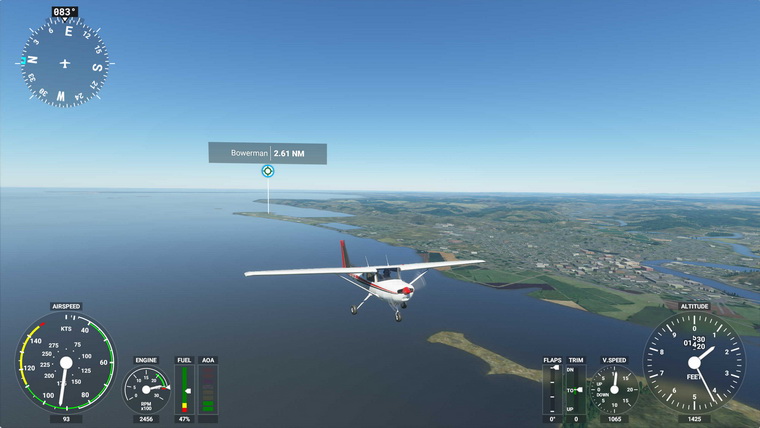
Just played the new Microsoft Flight Simulator (MSFS) for about an hour after spending the whole afternoon downloading the files to my computer. Frankly speaking, although many alpha players praised it highly on the Internet, my first impression on it is quite disappointed and even worse than my first time with X-Plane 10.
Maybe my i7 CPU is not fast enough, maybe my graphics card is not high-end enough. The simulator severely stutters from start to end. Even though I configured it to the lowest graphics settings, it didn’t perform satisfactorily. All my drivers were updated to the latest.
Moreover, many of my flightsim gears, like many others, are from Logitech. And since the company is not a part of the “partnership” team, so there’s no preset profiles are available to my Yoke, TPM and rudders. I needed to set up all of the buttons and axes from scratch manually.
The worst is the new simulator is not using the exact terminologies that we have got used to from FSX/P3D or even X-Plane, I spent no less than 30 minutes to figure out what some of them really mean. And up to now, I still don’t know how to map the Throttle Axis on my TPM to the Throttle Decrease and Throttle Increase in the simulator.
It shouldn’t be that complicated, right ? Appreciate it if anyone could tell me how if they know how to do it.
By the way, I found no propeller Axis in the simulator. Not sure how it’s gonna to cope with those planes with propellers on them.
Oh yes, when mapping the buttons and axes of existing gears to the new 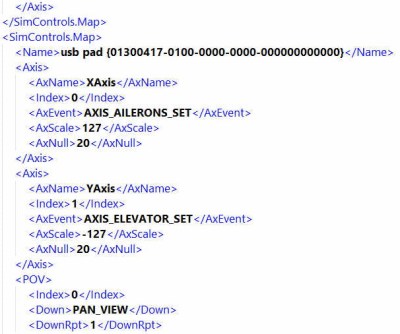 simulator, one can make reference to the control setting screen in Prepar3D or the “Standard.xml” file under “%AppData%\Lockheed Martin\Prepar3D v4\Controls” folder. They give you a quick info of which buttons and axes are being used and assigned for which functions.
I am glad that I didn’t purchase the MSFS immediately but joined the X-Box Game Pass, which costs me only US$1.0 for the first month. Will keep on exploring it, of course.
Lastly, as a game, MSFS may be good with the right hardware.
But with so many incompatibilities with so many existing flightsim gears (and software addons) on the market, I doubt the MS2020 is going to become a serious flight training tool in the short future in my opinion. Not to mention it’s going to take over P3D or X-Plane in that area. But we’ll see.
In theory, it shouldn’t be that bad.
 FS Times
For anyone experiencing CTD’s in the early stage of this sims release, maybe try this tip I saw today on ORBX forums by a user called Jaydor from Wales UK … never realised we had this option.
He describes how to Repair and / or Reset the simulation.
Was more or less CTD free during Alpha/Beta, but first flights were plagued with them on full purchase, it did cut out many times on full purchase download though and I had to keep resuming, did have a flaky USB periph cable and replacing it seemed to sort it, but had another CTD after an hour and a half’s flight the other night, if this happens again I’ll try his method, beware though, one method he describes will scrub any controller sets ups you may have done, would like to find out how to back up a controller config if anyone knows?
Failing that I’ll try a delete and full re-install again once the rush is over and servers are less loaded and I might have less download interrupts.
We’ll get there, its early days.
https://orbxsystems.com/forum/topic/198662-i-had-a-good-working-msfs-until-i-installed-orbx-sceneryctds/
LikeLike
For those who are having performance issues, make sure you are not running any utilities that rely on Simconnect. When I stopped using Spad.Next and Simshaker my frame rates went from ‘basically unplayable’ to excellent.
LikeLiked by 1 person
Good suggestion, Steven. Will give a try when I am back with it properly.
LikeLike
Joe Lavery … its a lot of spec and a lot of money, very impressive of course mate.
I honestly dont think FS2020 is a sim you can throw expensive spec at the way we used to with CPU bound sims like FSX etc though, this sim is different, high time it should be too, at last we can use more ram and more GPU power … remember FSX 32 bit limitations, we can use up to 32GB in this sim, not quite reached that limit myself yet, but close sometimes, on my 32 GB but it has made me calculate 64GB as a minimum for my next major upgrade and by that time, it will be DDR5.
Its an awkward time to be upgrading for just this one sim right now IMHO., if you are struggling, then go for it, but if you can manage a little bit longer, you will have more options and quite soon.
There is a lot more faster on near horizon if we can wait a tiny bit more.
FS2020 still has to be finally optimised too IMHO, remember FSX, it was same kind of launch, but service pack 1 and then 2 fixed a lot of things, and of course the Acceleration pack for more content … we’ll see similar for this sim too I’m sure, maybe not an official MS Acceleration pack, but they have opened up to third party’s more than ever before now.
There is a lot to be said for current AMD processors just now, they are not lagging that far behind a very expensive hot Intel CPU for what we like to do, was tempted to go for AMD build this year, but my I7 8700K delidded and water cooled and overclocked to 5Ghz, this CPU is doing me proud … FS2020 unlike its older brothers is not stretching our CPU’s so much, indeed an in tests, its the GPU now for this sim … and unfortunately modern GPU’s are still expensive due to that recent mining fad.
I used to upgrade my hardware relentlessly each year, for futile little gains, the forthcoming Nvidia 3xx series seems perfect for MS 2020 and other stuff i play, have held back a few years, it will be this year I’m sure for a graphic card upgrade over my trusty Titan X pascall 12MB vram.
Been using past year or so to spend money i would have done on yearly hardware PC upgrades on Flight sim Peripherals instead, these are now standing me well on FS2020 and military sims i like.
LikeLike
it’s not mad Joe, this is the cycle of Gaming/ Simulator. You put high end Rig, it runs amazingly fast, then you start to add Addons, and your Rig start to slow down, the Sim turn to act like Hipo, you start to upgrade component, trying to tweak, spending most of the time configuring, and figuring out what is wrong with your setup, feeling sorry for yourself for not obtaining Master in Science, forgot that you are “here” for Flying. at some point either start from scratch getting the latest Rig, or going back to Golf or playing Poker …… after all, the world goes around & around ..lol
LikeLike
Just to add to conversation, it was indeed a faulty USB peripheral cable that was causing a controller to drop out and cause my CTD’s. new cable in and did a flight from Inverness Scotland, touch and go at Kinloss, land full stop at Lossiemouth and thought lets go to Aberdeen Dyce, all fine, was crashing every 5 to 10 minutes before I found my fault, an hour + flight with no glitch, am happier now.
Rig spec here is I7 8700K de-lidded and water cooled 5Ghz all the time on all 6 cores, this sim is very GPU dependant though, my current GPU is a Titan X 12 MB Pascal version, about same power as a good 1080Ti .. skipped the RTX 20xx series, looking to buy an RTX 3080 Ti soon, an announcement is out on 1st of Sept. Have 32 GB 3600 ram, dedicated Win10 OS M.2 SSD, dedicated SSD’s for FS2020, P3D, Mil sims and for games too.
Recently bought a 55″ 4K Samsung TV (after lots of research) just for this sim, its all running quite smoothly but will need that forthcoming RTX 3080 Ti for when I try places like NYC and suchlike.
Joe Lavery, was on Alpha then Beta since start of year, no free version for me, but I don’t mind, you work for PC Pilot I think, so yes, you will get a press ver, fair play … there was a fair bit of final polish from last Beta to release version, imagine some patches will be coming fast and furious now too, always seems to be the way.
So long as MS dont dump this early like they did other sims, this one should mature quite nicely IMHO.
LikeLike
I whole-heartedly agree. I purchased the deluxe premium edition after being impressed by the closed beta but wish I had waited to read the reviews and forums before parting with my hard earned cash. I have had nothing but software / hardware related crashes since I first set MSFS up and have yet to complete a single planned flight. Even the installation itself was such a stressful experience. I have no doubt that the problems will get Ironed out at some point but in the mean time I will stick with my perfectly functional Prepar3d, X-Plane and DCS.
LikeLike
Hi Tom
Been meaning to reply to some of your excellent topics for a while, but life has been hectic for lots of reasons really.
MFS or FS2020 is still a bit flawed I agree, was on Alpha then Beta until that stopped yesterday, it was only in Beta for slightly less than a month I think it was, someone somewhere must have said, release it already?
Agree too, the control set up seems crazy, but after a while and once you grasp what they want you to do it makes a bit more sense and is quite comprehensive when you consider this is going to get a console release to with the newer X-Box … having said that, wish they had kept the older FSX/P3D control set up, most folk could have got a set up going in 10 minutes that way and hit the ground running to so to speak :)
Propeller is there, axis for it too, not easy to find I know, basically what you have to do is switch between Assigned, Essential, or All (I think it is off top of my head) … if you go to “All” for your highlighted controller you will find it there or in search … looked for you about 15 minutes ago :) I’m still trying to figure some of it out myself to be honest!
Have a look at this video, this guy explains why it is this way and how to set up controls, he has other tutorial set up videos too that are well presented on this new sim.
Bought Premium Deluxe version myself but unlike the Alpha/Beta getting lots of CTD’s … think I may have traced this to a faulty USB peripheral cable cutting in and out, this sim does not like periphs plugged and unplugged while running, hope that’s it, going to try a bit more with it tonight.
Hope al is well with you and family Tom.
Colin
LikeLike
Wondering what’s your Rig spec ??
LikeLike
Hi Tom,
What PC specs are you using?
Microsoft have provided a set of suggested requirements which cover different levels of realism. I was on the BETA team, and found it pretty much fluid with the sliders set to ULTRA.
I haven’t had my press copy yet so I can’t tell if there’s a difference in the release version. My specs are:
Intel i7 9700K 3.60 GHz Processor
32 GB DDR3 3200 MHz RAM
Gigabyte GTX 1080Ti, 11 GB GDDR5 Video card
1 x 1 TB NVMe M.2 SSD
1 x 3 Terrabyte Samsung Hard Drive.
32 inch 4K iiyama Monitor
Regards
Joe.
LikeLike
..hummmm ..that doesn’t look good, I just sold my i7-4790k Base Rig, which did very well with XP11.5X and Vulcan, was thinking to put something together that will looks exactly like yours (I have the 1080ti) but now, I think I might call NASA, check with them if they have something that they ,recently, retired …. anyway Tome, base on what you are telling us it’s better to stay put for a while …..
LikeLike
Just a thought for anyone who thinks my setup is a bit excessive, This shopping list was added yesterday to the Cockpit Builders forum. A serious amount of cash needed for this rig, which he is now running MSFS on.
Intel i7-10700 octacore CPU
Asus ROG Maximus XII Formula LGA 1200 Intel Z390 mobo
16Gb X 4 (total 64Gb) Z.Skill NEO low latency DDR4 4400Mhz RAM
ASUS ROG RTX 2080 TI OC 11 Gb x 2 video cards
512Gb PCIe M.2 drive on mobo M.2 slot 1 for Win10 Pro
2TB PCIe M.2 drive on mobo M.2 slot 2 for user and program files
512Gb PCIe M.2 drive on mobo M.2 slot 3 for MSFS 2020
2Tb Samsung 890 Pro SSD for fast library
8Tb Seagate IronWolf hybrid HDD for misc library
Video cards cooled by 420mm radiator on front of case
CPU and VRMs cooled by 360mm radiator on top of case
Mad or what????
Joe.
LikeLike
Dear all, thanks for the feedback. Just wake up and will read the comments later.
Followings are my spec:
Asus Maximus VI Extreme
Intel i7-4770K OD to 4.0GHz
Corsair DDR3-2133 RAM 16GB
7 Samsung SSD Storages with various capacity
MSI GeForce GTX 780 x 2
Windows 10 Home 64-bit 2004
Not very powerful but still passes the minimum requirement listed by MS. The spec runs P3D satisfactorily.
BTW, I was trying to install FS2020 onto my other computer with following specs:
Asus X99-Deluxe II
Intel i7-6850K OD to 4.0GHz
Corsair 2133 RAM 32GB
4 Samsung SSD Storages with various capacity
Asus GeForce GTX 1080Ti
Windows 10 Home 64-bit 2004
However, installation was not successful. The update process doesn’t copy files to the F: drive (400GB storage) on my computer.
Already have drivers updated to the latest, and have USB devices disconnected and running the app in Admin mode. Antivirus, Windows Defender, Firewall all disabled.
Not sure why.
Will keep trying to install the game. FS2020 on this PC should perform better.
LikeLike
.I meant spec like Joe
LikeLike