
Remember Alexey’s G Flight Yoke 180° modification and repair project in Post 586 ? He just notified me that the project has completed. 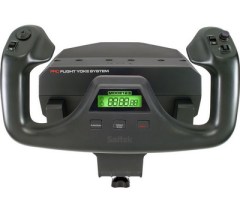
The last step was to install the Leo Bodnar’s custom controller board instead of the broken Saitek’s board. As the result, the yoke kept 90% of its previous functionality except for the mode switch and the timer display. With the new board the yoke’s input became smoother, so the 180 degree rotation mod applied earlier now allows better control of the aircraft. The last mod will also help people whose yokes are broken to bring them back to life with the help of Leo Bodnar’s controller board, said Alexey.
Anyone interested in his project could see the videos showing the last modification and testing here:
https://www.youtube.com/watch?v=uQNZD7eza5I
https://www.youtube.com/watch?v=UR-yQ_quUD4
The 3D model of the controller board’s holder as well as installation instructions can be found here:
https://www.thingiverse.com/thing:4680136


In the end I opted for my Arduino Mega solution.
Even better yet, I’ve been able to replace the original LCD display for a 16×2 Arduino LCD display. I’ve developed the Arduino software to work with SimConnect and UIPC4 to make use of data from the flightsim and be able to display it on the LCD.
I even used the rotary mode switch to change the info on the LCD. It can show Aircraft Title, Altitude, Air speed, Heading and ATC call id. This now works much better than the original display but I also integrated a real time clock and a stopwatch with the same functionality using the three buttons below the display.
Since the Mega allows for 4 analog x/y/z joysticks I can even attach the thrust lever that previously used the PS/2 connector to the same Mega. With a total of no less than 32 digital switch inputs every switch is covered.
I’m very happy with these changes as I always found the Saitek display functionality rather poor.
I also did two mechanical mods, both of which are usually done with rubber band mods, but I chose spring mods for that. These are more reliable and also easy to do.
The details of all of these mods will be covered in several videos on my youtube SimDuino channel.
LikeLike
So did you try the new USB2504 chip before changing to the Leo Bodnar?
I’ve got the same problem, blown main board, and I’m currently looking into several options.
One is using a “tricked” Arduino Mega2560 board, which can be used if it has an Atmel USB chip, as a joystick. Since I have 4 of those boards, I have that working but need to connect it to the yoke, should
work.
Another is to buy a small PC joystick board on AliExpress, these have some 12 switch inputs, a hat switch and analog joystick interface, connecting directly to USB. This should also work and is a very cheap solution (around $6).
Leo Bodnar is ok, but pretty expensive compared to these solutions. Even buying the cheapest thrustmaster usb joystick and using that mainboard is cheaper (I did this with the thrust quadrant that connects with the 5 pin din to the yoke, works perfectly).
LikeLike