
FPS hit isn’t uncommon when a pop-out screen is moved to a second monitor, despite how small and low resolution of the monitor it might be.
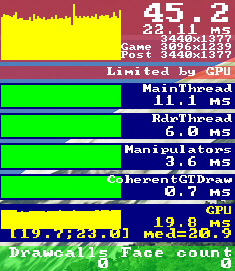 In a “conversation” I had with Michael Basler in Germany earlier last month, he said that his fps were literally cut by 50% when he shifted a pop-out screen to a touch monitor connected to the main computer.
My reaction was: since I don’t see any performance hit from my GNS430 and GNS530 connecting to the motherboard’s integrated graphics ports, I suggested him to give it a try if his computer supports the feature.
Later he came back to me saying that he still couldn’t believe it but it works.
He said that even though he still got more than 30% fps hit when popping out the GTN gauge from the airplane he was flying, he regained all the lost fps as soon as he moved the GTN to the touchscreen. “It’s pure magic,” he said.
Michael added that he was very grateful for the tip, and since he heard many people, mostly in the home cockpit builder’s subforum of the official forum, for whom this fps hit is a stumbling block, he suggested the integrated graphics option might be well worth an entry in my blog.
Now you heard the story from Michael and me. You mileage may vary but if you are 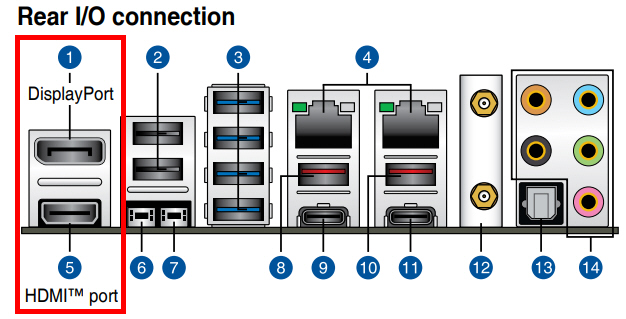 baffled in a similar situation, why not give the integrated graphics a chance even if you already have a very high-end dedicated graphics card.
–
 FS Times
I think most, if not all, of us have a dedicated graphics card, either Nvidia or Radeon. Plus, most recent CPUs have a basic integrated (Intel- or some other) graphics adapter. Usually, you’ve got 3 or 4 external ports (HDMI or DP) from the Nvidia/Radeon card plus another two from the integrated graphics adapter on the backplane.
As Tom states, make sure you have the integrated graphics enabled in the BIOS, if you want to try this. Mine was deactivated initally, I think I deactivated it myself years ago as I didn’t see a need for it.
LikeLike
So this only works with small screens (mainly instruments); not with an outside view.
LikeLike
If it is not for flightsimulation, big screen is ok. I installed everything with a monitor connected to it only (without external card) for my last PC.
But we know all flightsim demands a lot from cpu and graphics, the onboard one surely can’t handle well in that respect.
LikeLike
Hi Tom…I’m not sure exactly what you are suggesting as
the “fix”…could you please be a little more specific as to
how the “fix” is implemented?…thanks, John Helms
LikeLike
Hi John,
I didn’t say it’s a fix. Michael and I only suggest that using the onboard graphics function could (or might) “cure” the dropping of fps when a pop-up screen is moved to a second monitor. In our cases, the “cure” works.
Please see my reply to TJANDER in the comment section as well.
Everybody’s mileage may vary but worth a try if there’s a need and the function is there. ;)
LikeLike
Tom
Interesting post. Do I understand you to say you use a dedicated graphics card for the main monitor and the built in graphics card for a second monitor? I was not aware that was possible I though you could only use or the other? Not both a dedicated card and onboard card at the same time.
Tom
LikeLike
Correct. In my setup, I use my dedicated graphics card to connect to three (3) TV monitors, and use the two (2) integrated graphics ports on the motherboard to connect to two little monitors on the RSG GNS. Total five (5) monitors running at the same time.
You may have to activate the function in BIOS if your mother board and the CPU comes with integrated graphics capability.
LikeLike