
Probably you have heard many suggestions saying that by increasing the CPU priority of a flight simulator from Normal to High, the program will run more efficently and stably. I found it’s true on P3D and MSFS in my case.
Instead of manually changing the CPU priority to High everytime when MSFS starts, I am using the following simple app to help save my preferences for good.
It’s called Prio – Process Priority Saver by O&K Print Watch.
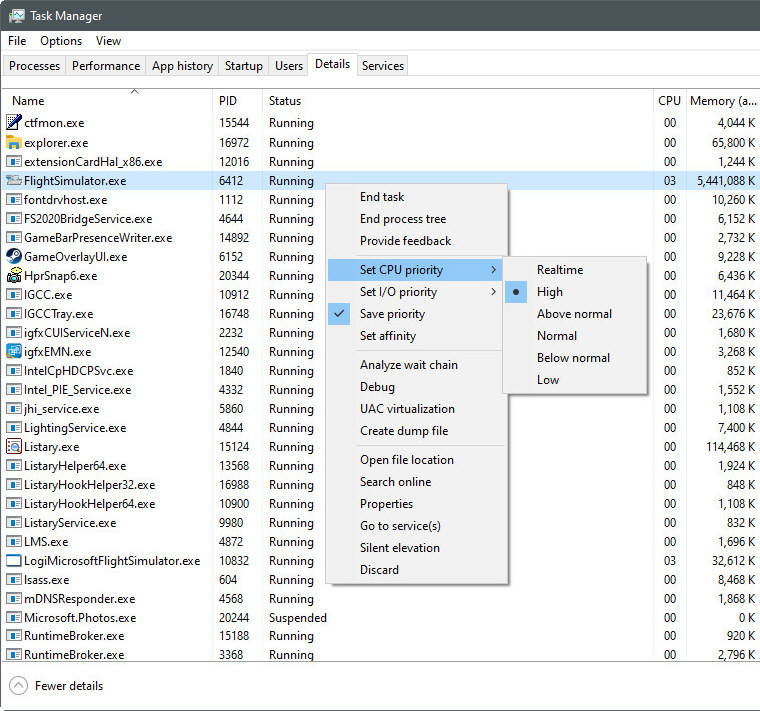
I am quite happy with it so far.
Since the app is from Russia, here’s a review of it by TechRepublic and a safety analysis from file.net, hoping that would comfort those (in particular who live in the US) to decide whether to use it or not.
Your mileage may vary.
–


Sadly it doesn’t work for me. It’s not saving the priority, although I have the Save priority checked :(
LikeLike
sorry to hear that
LikeLike
same problem… you have to pay…. ;)
LikeLike
Hm…that’s strange. I have no problem with it.
Anyway, paid alternatives got more features.
LikeLike
Do you have MS Store or Steam version of MSFS?
LikeLike
Are you sure? I thought you have to pay for the commercial license, otherwise, all the functions and features are the same?
LikeLike
I am having Steam version of MSFS.
In the buying page, it says No Support but “The program is free for personal use only. No commercial use.”
https://www.prnwatch.com/prio/buy/
LikeLike
That’s exactly what I meant – the priority saving function should work in the free version also. If you want to use the program for commercial purposes you have to pay for the license.
I suspect that the Store version of MSFS somehow blocks Prio from saving the priority but on the other hand Steam version doesn’t.
LikeLike
I see. BTW, do you mean everytime you start your Store version MSFS, the CPU priority returns to Normal even you have used the saved function in Prio ?
LikeLike
Yes. It’s not saving the priority, although I have the Save priority checked.
LikeLike
Sorry about that.
LikeLike
I was using Prio all the time in Windows 7 but then, if I remember correctly, it didn’t work in Windows 10 or something so I stopped using it. I started to use Process Lasso for the same purpose but I don’t use it anymore since I ditched P3D and I exclusively fly in MSFS. Thanks for the info about Prio!
LikeLike
Yes, I think it’s good
LikeLike
Hmm … After reading File.net, I’d stay away from this.
LikeLike
Why? I read it and found no reason for concern.
LikeLike
Sure. Not everyone needs it.
LikeLike
No, I was wondering why would John stay away from it after reading file.net. I read it and didn’t find any reason to be concerned.
LikeLike
Nothing wrong with John to be cautious. We all have our preferences and judgements. That’s why I put the two reference links to let users to judge for themselves.
LikeLike
The technical security rating is 78% dangerous, Only 15 users comment and 3 out of 15 think it is dangerous. Call me cautious.
LikeLike
Sure. There are other alternatives or you can simply run MSFS as it without changing its priority. As long as what fits you most.
LikeLike
Your choice. Nothing wrong
LikeLike