
Alhough I just updated my MSFS graphics settings not long ago, I find re-turning on V-SYNC with 33% Refresh Rate is, under most circumstances, giving my system a slightly more stable and crispy image performance, especially with the newest 528.49 nVidia driver installed, no matter if it is just psychological.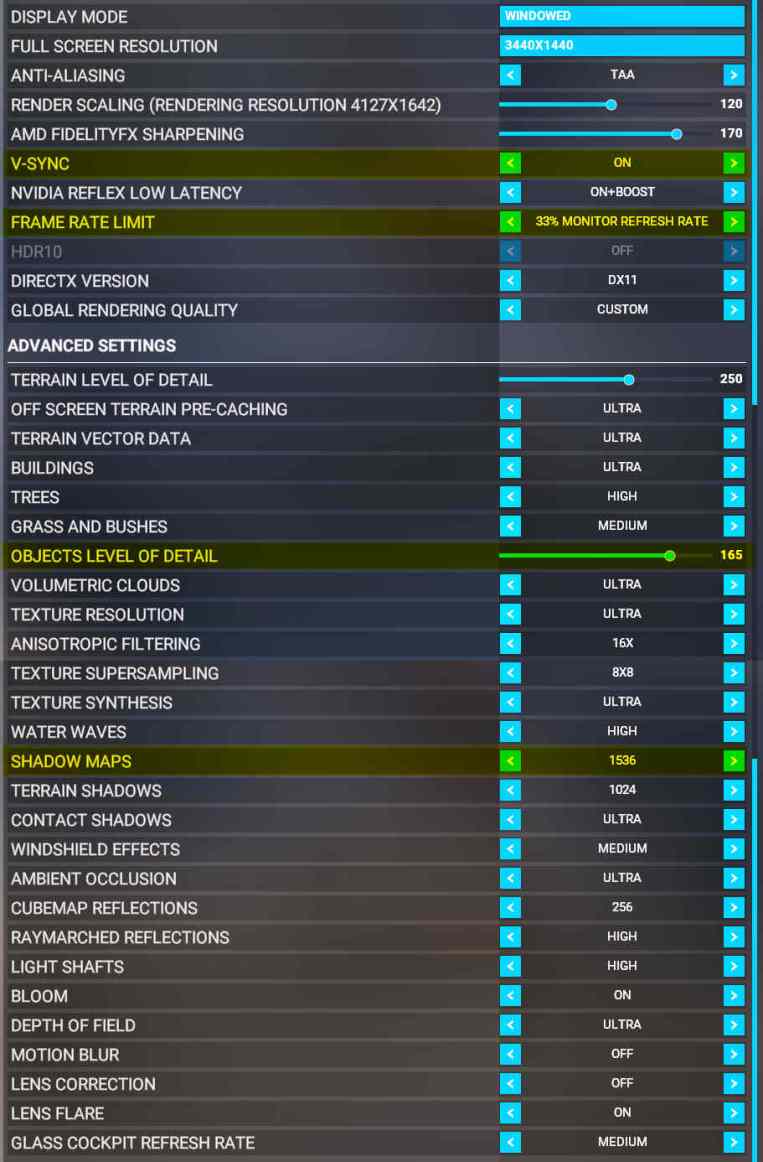 In addition, OBJECTS LEVEL OF DETAIL is reduced from “170” to “165“and SHADOW MAPS increased from “1024” to “1536” accordingly. The rest remains unchanged.
Your mileage may vary. Try for the best values yourself.
—
—
 FS Times
If you have anisotropic filtering enabled in the Nvidia panel, you can disable it completely in the MSFS settings. In addition, since the setting is redundant, this will gain you a little more performance.
LikeLike
I used to turn it off before but found no difference with it or not. Anyway, will test it again. If so, will update my settings accordingly.
Thanks a lot.
LikeLike