
Firstly, just to confirm that SPAD.neXt is FS2024 compatible after the recent update. Tested it with my FIP gauges and so far so good.
Also, Flight Tracker plugin for Elgato Stream Deck is FS2024 ready, too.
Back to FS2024, look at the picture below. All instruments are obscured. It’s just like their surfaces are made of poor greyish glass, and the LEDs are worn out so they can’t be seen clearly. This problem isn’t just on third-party airplanes but on all default airplanes as well.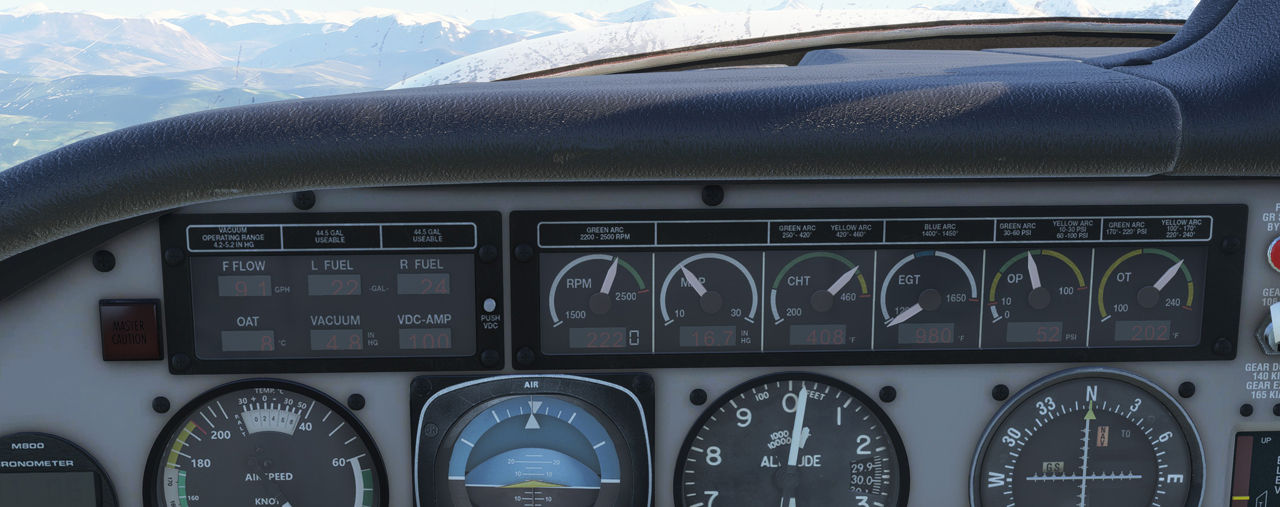
Oddly, I don’t see people talking about it. Something wrong in my settings?
If you have an answer, let me know.
In addition, the local time showed on the plane in previous simulators now becomes UTC. Not sure if it is intended or not.
I can accept that incompatibility is inevitable as FS2024 is a new product, not officially an upgrade from FS2020 as Asobo says.
But even so, I have to say again that, at this very first launch, it’s an immature product and I am disappointed with it.
 FS Times
I ahve the same issue with the grey/smoked glass on several aircraft. Originally i thought 2020 transferred ones but have seen it on a couple of the default aircraft also. I also note that the deluxe and premium deluxe versions have not downloaded yet either so we are only getting the standard version aircraft plus any 2020 marketplace addons. This is an issue for me if i can’t disable some of those addons as they don’t work well in 2020 so i doubt they will work well in 2024.
The UTC time variable has changed and impacts the likes of Beyond ATC with the sim recognising real time UTC only not computer time or sim time. That means controllers say good evening if the real time is late in the day even if you have the sim time set to early morning.
LikeLike
A mess for the moment in short.
LikeLike