Skyclock is a little app (offering both paid and free) for iphone which uses the phone’s GPS or network location service to calculate twilight periods for the present day virtually anywhere in the world. It surely add some fun to the flightsim experience by matching the Civil, Nautical or Astronomical Twilight hours it displays.
Author: Tom Tsui
32: HK International Airport Bug Fix
The HK International Airport VHHH from Imagine Simulation is not a bad supplement to FlyTampa’s HK Kai Tak Airport VHHX.
However, the product is a bit overdone because it mistakenly replaces FSX’s default buildings from the adjacent area, which in fact is more true to the reality. Continue reading
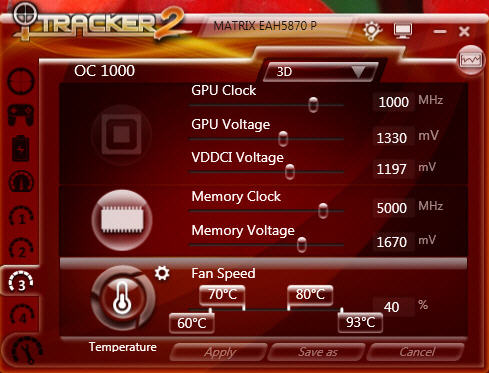
31:My HD5870 Overclocking Profiles
Followings are the overclocking profiles of my ASUSTeK MATRIX HD5870 P/2DIS/2G
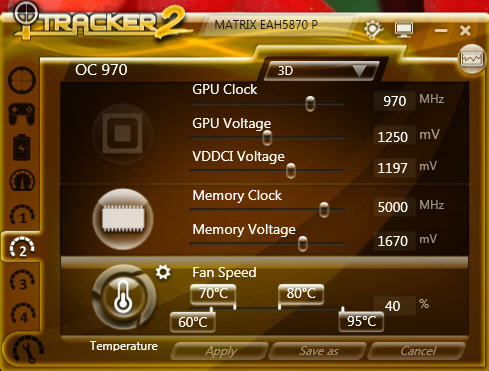
I generally flighsim under 970MHz setting but sometimes further OC to 1000MHz as follows:
30: Flight Instrument Panel Tweak – Part 3
I got three Saitek’s Pro Flight Instrument Panels. They are good but expensive, too. Moreover, the more of this FIP are attached to a system, the more impact of it affects FSX’s performance.
Using earlier Tweak 1 and Tweak 2, my three Panels are setup as picture shown below, and each panel controls two related gauges:
AIRSPEED <—> RPM
ATTITUDE <—> DIRECTION
ALTITUDE <—> VERTICAL SPEED
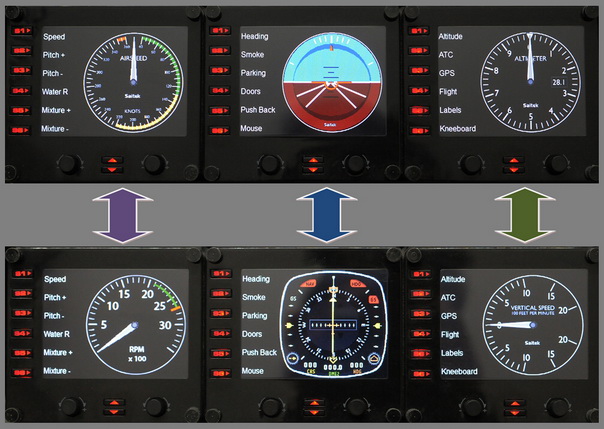
Under this arrangement, I can simply press the up and down buttons to easily access the six basic gauges on small planes I usually fly.
29: Flight Instrument Panel Tweak – Part 2
On each Pro Flight Instrument Panel (FIP), there are six physical buttons (S1 to S6) located on the left hand side of the LCD screen, which are predefined as:
The functions of these buttons are defined in the SaiFlightSimX.xml file under C:\Program Files (x86)\Saitek\DirectOutput directory as described in Tweak 1 (see below).
28: Flight Instrument Panel Tweak – Part 1
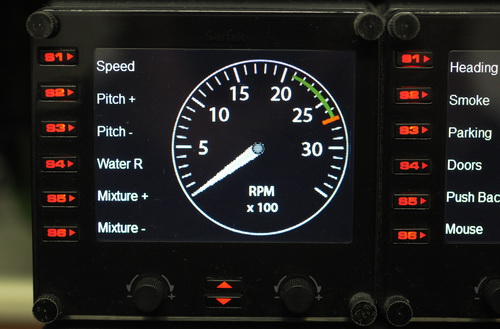
Saitek’s Pro Flight Instrument Panel (FIP) comes with an XML file that defines the order of gauges to be shown when starting up. The default order is:
Altimeter<-> Airspeed<-> Attitude
<-> Compass <-> Turn Indicator <-> Vertical Speed
This order is also true to the sequence of gauge starting when more than one FIP are included in the system. By editing the XML file, the order of the six gauges to be shown can be arranged as desired.
Here are the steps:
27: fsx.CFG – Texture_Bandwidth_Mult=800
TEXTURE_BANDWIDTH_MULT under [Display] section of fsx.CFG controls video hardware’s texture transfer rate.
Default value is 40.
If a graphics card comes with 1GB or even 2GB video memory, you may try increasing the value for a smoother display quality.
26: Remove Unwanted Views

In FSX, there are many views one can choose from and cycle through by pressing S (next category) and A (next view in category) on the keyboard, including Cockpit (2D), Virtual Cockpit (3D), Locked Spot, FlyBy, Top-Down, etc. Often there are views that we seldom or never use, however.
Steps below will get rid some of them for good.
Option 1:
1) Locate Cameras.cfg (x:\Users\<user>\AppData\Roaming\Microsoft\FSX) and make a backup of it
2) Open the file and you will find 11 Camera Definition sectons inside
3) Just delete the Camera Definition section(s) you don’t need
4) Save and Exit
25: Follow Your Eyes
FSX Banking Camera is a very interesting utility that can change the viewing angle of virtual cockpit while the aircraft is banking. It is, in some way, like a simplified version of Natural Point’s TrackIR.
Unlike TrackIR, it doesn’t need any hardware and won’t cause any FPS dropping. Moreover, it is free.
The program can be downloaded from the developer’s website which includes more information about the program.
 FS Times