331: 30,000-Something Invalid Paths

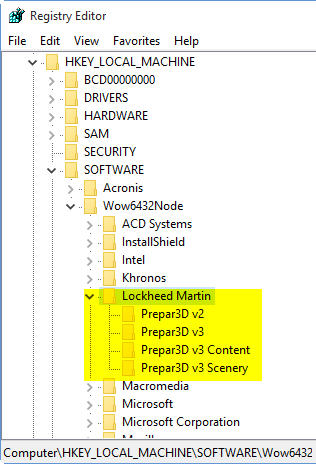
It is commonly known that every piece of software after removed from the computer could have left some invalid registries behind.  But I was shocked to find out that the total number of invalid path registries left by Prepar3D v3.0 could have crazily accumulated to 34,423 entries.

Unbelievable but it is real.  It took me nearly three hours to clean them up from my computer earlier this evening.

If you have updated to P3D v3.1 recently (no matter it was by patches or by re-installation), you’d better run a thorough system check.   Maintaining a clean and error-free system as always is critical to keep the flight simulation, both FSX and P3D, to perform in best condition.


 

329: AffinityMask=256

AffinityMask is the highest searched subject in my blog.   There are many recommended values over the Internet and I’ve tried and explored many of the suggestions (see my various Posts here) for both my FSX and P3D systems.

Since early last year, I’ve been using  AffinityMask=256  in my P3D setup.

I know the Binary of 255 equals to 11111111, which represents the using of all 8 cores on a Quad-core 8-Thread CPU when it is assigned for the AffinityMask.

And the Binary value of 256 equals to Continue reading

326: Prepar3D v3.1 – A MUST Update

Perhaps some of you already aware that Preap3D v3.1 is out.   If you are still hesitating whether or not to update, just in fear of any unexpected issues, especially the Xmas is coming, I would say “Yes” — Definitely — even just for the enhanced lighting effect.    Click images below to see the full pictures.

P3Dv31-03_resize1P3Dv31-02_resize1

They are gorgeous, aren’t they?  Continue reading

318: Another Network FIPs Start Up Approach

In response to the last article regarding Starting up Networked FIPs Locally, Michael Basler recommends another simpler and even more versatile approach.   Here’s the note from Michael:

==========

I start the simulator Continue reading

317: Starting Up Networked FIPs Locally

TechLevel02W
Putting FIPs on a networked PC
could reserve system resources for the simulator but the FIPs on the remote computer have to be started manually.

Stefano Cancelli in the Comment section of the story provides a solution by using a Microsoft utility called PSExec.    Via PSExec, the FIPs on the networked PC can now start up automatically when FSX on the local computer launches, and quits when FSX exits.

Very useful tips and followings are the instruction from Stef: Continue reading

316: A Quick Word on P3Dv3

Is Prepar3D version 3 better ?

Definitely.   I find improvements a little bit here, a little bit there.   Overall about 10% better than the last version 2.5 in general I would say.

Justified to pay in full again ?

Definitely NOT.   I accept an upgrade fee but definitely not willing to pay in full again.

Sadly, we don’t have a choice if we want to stick with Prepar3D.   We will do it sooner or later eventually.

Finally, be prepared to pay again after another 24 months or so.   What a company !

315: A Temp Solution to Fly P3Dv3 with Existing Addons

TechLevel01W
The new Prepar3D Version 3 (P3Dv3) takes the same approach P3Dv3_00as its predecessors to include the version number in its system registry (from Prepar3D to Prepar3D v2 to Prepar3D v3).   Making many addons have to rebuild a new installer in order to recognize the change, even when the new P3Dv3 is installed onto the same drive and same program directory as the previous version.
For those who wouldn’t want to wait for the release of new compatible installers, here’s a quick temporary solution to run the new P3Dv3 with existing addons from earlier versions.

I am using Orbx’s addon as an example.   And the region used in P3Dv2 is set to FTX Global Hybrid.

My Prepar3D version 2 is installed on P:\Prepar3D, and version 3 on P:\Prepar3Dv3.
Continue reading

314: Connecting FIPs on Networked PC

TechLevel02W
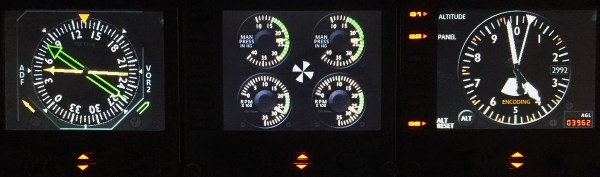
Running Flight Instrument Panels (FIPs) will drag the performance of the simulator to some extent.   To minimize the impacts on some not so high-end PCs, off-loading them to a spare computer isn’t a bad idea.

FIP B_Gauges
Off-loading FIPs to Another Computer Could Minimize Performance Hit to the System.

To those who are “network-phobia”, here’s an example how I put the FIPs (with some help from Ricardo in the first place) to work on a spare computer in my family network. Continue reading

312: Make a Better World, Virtual and Real

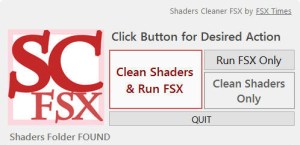
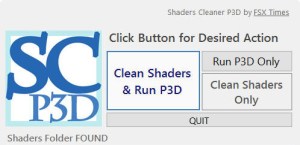
Rebuilding shader cache is a commonly used method to fix many issues suddenly coming up without a proper cause in either FSX or P3D.  Shaders Cleaner helps clean Shader Cache right before the loading of FSX or P3D.


Anyone interested to get a copy the utility please make a donation to Medecins Sans Frontieres (MSF) / Doctors Without Borders so as to help those people out there needing the love and care from the medical humanitarian organization.

Proposed donation amount is USD 5.0 for either the FSX or P3D version of the utility, or USD 8.0 for both versions.   More are appreciated, of course.

To make your donation now, click here.   Or you can click on the Shaders Cleaner images above, and then click on the [DONATE NOW] button and forward your MSF donation receipt to me at tom.fsxtimes@gmail.com.  Do specify which version (FSX or P3D) of the utility you prefer.  Download link will be sent asap.
MSF_dual_English_SMALL1
What the world needs now is love.  Let’s give a hand to make a better world, no matter it’s virtual or real.