
Followings are my latest nVidia Control Settings, which have been slightly modified to cope with the changes in Graphics Settings of FS2020 and FS2024 I made earlier this month.
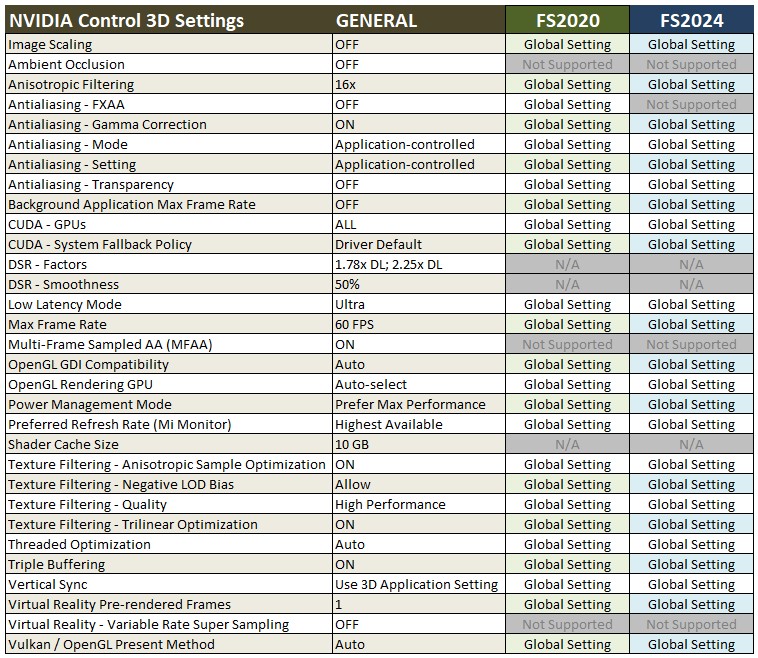
The Shader Cache Size in the Global Settings Continue reading
883: My MSFS Graphics Settings 25-0409
In the past, I’d been deciding my Graphics Settings based on trial and error. To be honest, I was quite happy with the results of what I achieved in general.
Last month, I decided to give the Nvidia App a shot to see how far my flight simulation system performance it can take. I was glad to find out the optimized recommendations by the App, both for the FS2020 and FS2024, were not far off from what I anticipated.
Followings are the latest upates of my FS2020 and FS2024 Graphics Settings after repeating adjustments for optimum results from my rigs. They are put side-by-side for quick comparisons:
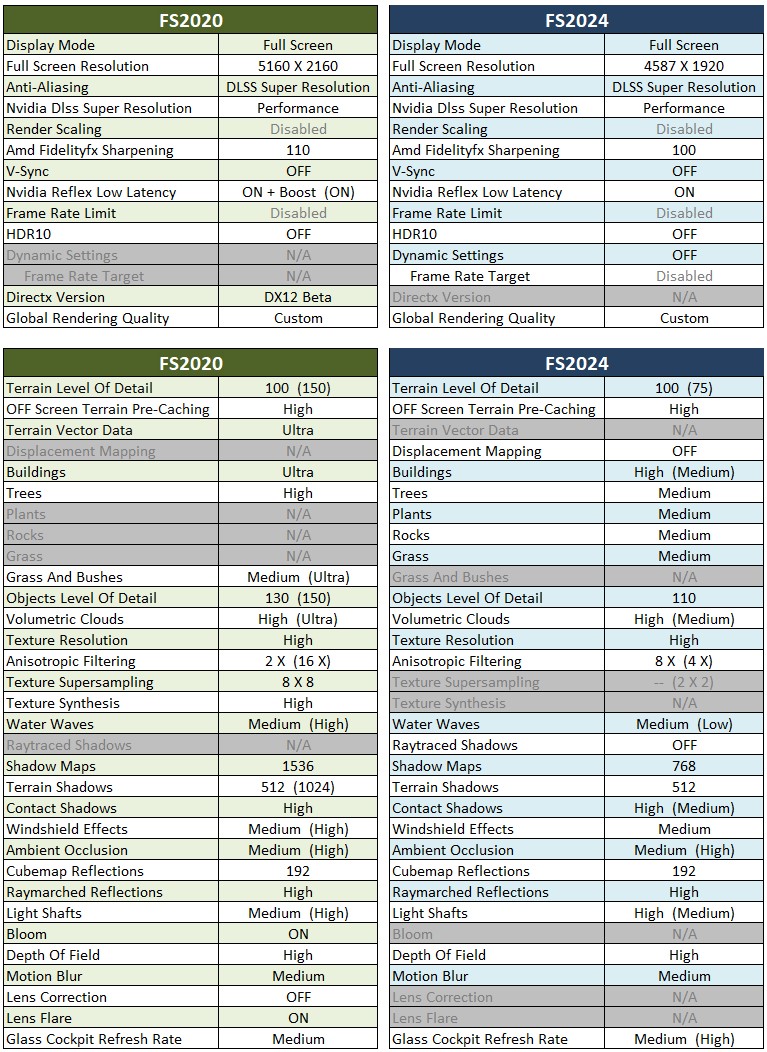
The values in brackets Continue reading
882: Changing Shorter Trees Density
The “Shorter Trees” by YankeeMike01 by default increases the tree density to 200%. After playing it for awhile, I prefer to lower it to original 100%.
To make the change is simple. Just copy the “00-asobo_biomes_fallback.xml” from the “vegetation.DEFAULTS” folder, and use it to replace the 200% one in the “vegetation” folder. That will do.
Should you need to go back to the 200% density, simply Continue reading
881: My ReShape Settings Update 25-0403
After nearly two years, my ReShade settings for FS2020 have been slightly changed based on the color tone of FS2024 as follows: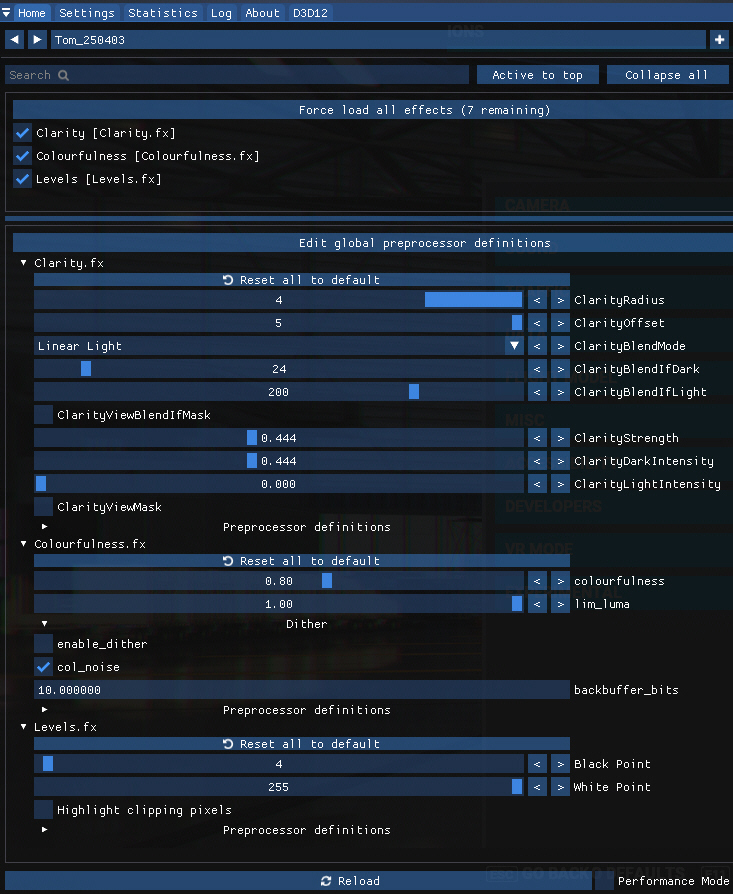 :
:
Continue reading
880: An Enhancement Shouldn’t be Missed
One of the most criticized issues with MSFS2020 is that the trees are oversized and don’t look realistic. There are many different solutions out there. For example, I’ve been using the “Short Height” Vegetation setting in REX AccuSeason Advanced Edition to deal with the issue. It does help a little, but the results are still not ideal.
Until recently, I found an addon in Flightsim.to called “Shorter Trees and Improved Density” by YankeeMike01. I was surprised to find out that it almost perfectly solves the problem of unrealistic oversized trees in MSFS, at least in my case. Continue reading
879: MSFS UnAssigned Keyboard Keys
Have you ever encountered a situation in which you need to create some Hotkeys for specific actions or custom controls for hardware peripherals? But then you suddenly realize that you have no idea which keys or keyboard combos are available.
Here come at last a complete listing of the UnAssigned Keyboard Keys that I have been wanting to put them together for a long time for references:


You can also download Continue reading
878: I removed FSUIPC from my system
In the good old days of FSX and P3D, FSUIPC by Dowson was a mandatory component for the running of FIP Gauges. This is no longer the case with FS2020 and FS2024.

However, I continue keeping it in my system because it is undoubtedly a powerful plugin with a wide range of features for flight simulation configurations.
Recently, I decided to uninstall it because I rarely use it in flightsimming. Besides, I wanted to see if I could get some benefits out of it.
Continue reading
877: Aimxyz with MSFS Videos
Here are two short videos to share with those who are interested to find out how my newly purchased wireless and attachment-free eye-tracking device AimxyZ are working with FS2020 and FS2024 in my system.
This is with FS2020
876: Single-needle VOR2 for C172 in FS2024
The VOR1 and VOR2 on the C172 were initially different as shown in the image below when FS2020 was launched. 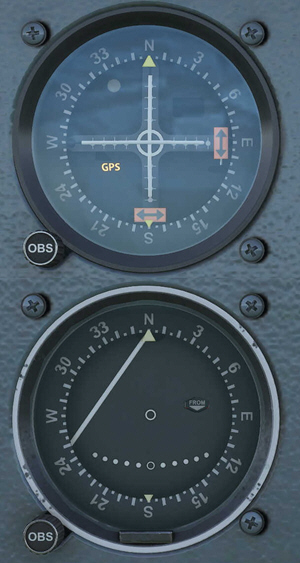
After 18 months or so, the VOR2 had changed to adapt an identical layout of the VOR1, making both gauges look the same.
Now in the new FS2024, the VOR2 on the C172 Basic models has reverted back to use the single-needle version again. Not sure if the instrument is going to follow the path of its bigger brother to become identical to VOR1 in the future or not.
Some MSFS C172 gauge users emailed me not long ago if I could re-develop the single-needle C172 VOR2 for FS2024.
Frankly, I don’t have an answer since FS2024 is still buggy and prone to changes.
However, Continue reading
 FS Times