305: The New Saitek Drivers – Part 1: Installation

Normally, driver installation should be no more than pointing-and-clicking on the mouse.   Saitek’s new ProFlight drivers, “ProFlight_FSX_Plugin_7_0_40_9_x64_Software” and “Saitek_Pro_Flight_Instrument_Panel_7_0_40_9_x64_Full_pfw”, however, might need a little tweak.

Some friends said to me that the installation of these two drivers was as easy as snapping fingers.   However, there were others telling me the opposite.  To be more exact, their FIPs wouldn’t start up after the installation, even though all the other Saitek gears work as usual.

To me, both statements are true since I experienced both extremes myself over the last few days. Continue reading

304: FIP Customizer Still Functions

Just installed the new Saitek drivers two days ago as its latest capability of displaying FIPs in desired order at start-up every time is a killer feature which has been longed for by almost all FIP users.

However, the installation or the upgrading of it could be a bit tricky.  I will write up another post later.

A good news, the FIP Customizer by Alexey still work perfectly with the new driver.   His other utility — the FIP Toolkit — has yet been checked, however.

303: Enhance Orbx Product Report Readability

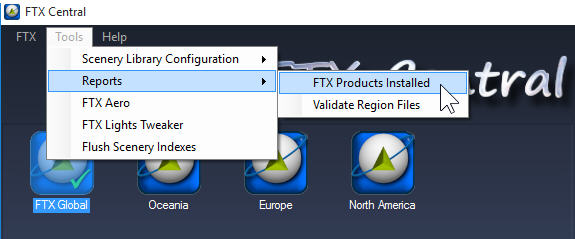
The Product Report generated via FTX Central is getting harder and harder to read when the list of the installed scenery is building up.  Installed-Central

To enhance readability, Continue reading

302: Commands Assigned to FIP Not Working

What a coincidence of receiving a few emails in the past two weeks asking why the commands (such as the barometric settings — KOHLSMAN_DEC and KOHLSMAN_INC) assigned to the rotation knobs and buttons on the FIPs are not working any more.   After checking their SaiFlightSimX.xml files, I found another coincidence that the <X52Pro> section in the beginning of their files was somehow removed.

Yeah.  I do remember as they reported that the SaiFlightSimX.xml file worked properly without the <X52Pro> section before.   Continue reading

301: Mouse Not Responding after Hot Unplugged

So far, the only problem I have with Windows 10 is: the mouse will stop responding to mouse clicks if any of the Saitek game controllers (yoke, rudder pedals, trim wheel, etc) is hot unplugged from the computer after use.

There are many similar reports on the Internet, and it is generally agreed that the issue is caused by the Saitek driver.   So far, no solution has been found.

The quickest way to put the mouse back to normal is to press the Reset button on the computer.   The soft reset switch via Ctrl-Alt-Del doesn’t work.

Edit:
Some friends, like Philip M, suggest to open the Devices and Printers in Control Panel and right-click to “Remove” the Saitek devices in question prior to unplugging them.  That’s another easiest cure of the problem as well.

 

300: Windows 10 FSX Crash-to-Desktop Fix

With Windows 8.1 two years ago, I experienced recurring crash-to-desktop errors on FSX platform after Orbx’s FTX Global Base was added to it (see my Post 228: FSX with Windows 8.1).

Now with Windows 10, thank goodness, the same combination (FSX + FTX Global Base) doesn’t crash to desktop any more.   But, my goodness, the excitement only lasts for two days until I added another Orbx’s regional product to the platform.

I really don’t know if it is FSX itself or Orbx’s addon the true culprit causing this notorious CTD problem.

Anyway, the tweaks I suggested in the earlier Post 228 are still valid.  Continue reading

299: The FTX Central 2 — I Never Like It

I never like the new FTX Central 2 because it combines the previous FSX and P3D versions into one single package.   If you have both FSX and P3D installed like I do, FTX_Central_Newyou then have to choose for the simulator you want to modify every time it is started.  That’s inconvenient and an overkill.

In addition, it compels you to read the company’s product advertisements on the program banner which you might not be interested at all.   It’s distracting and irritating.

And the worst of it all, the new FTX Central 2 forces you Continue reading

298: Cautious to the New Saitek Drivers

Perhaps some of you have noticed that Saitek has released two new drivers.  The “ProFlight_FSX_Plugin_7_0_40_9_x64_Software” is an integrated driver for all its Pro Flight products except the Flight Instrument Panel (FIP) which requires another new driver “Saitek_Pro_Flight_Instrument_Panel_7_0_40_9_x64_Full_pfw” to support it.

The up-sides of the two new drivers are:  they simplify installation, and the load-up order of the FIPs can now be configured.   The latter feature, in particular, has been a long-time request by almost all FIP users.

However, the down-sides are: Continue reading

297: A Summary of Prepar3D v25 Changes

The confusions many Prepar3D users encountered after upgrading to version 2.5 are the result of a mixed subtle to major changes happened to the program’s long-held file structures that was inherited from Microsoft Flight Simulator.

Although many of these issues have been addressed by third-party manufacturers, it’s still useful to know what are the differences.   Following is a list summarizing the changes (but not limited to) made to the new version compared to earlier versions:

Under Prepar3D Program Directory

  • Folders REMOVED
    Addon Scenery
    categories
    dialogs
    flights

Continue reading