
Starting-up and Shutting-down R22 manually in FSX or P3D could be tricky. Here’s my checklist (not for real flying, of course):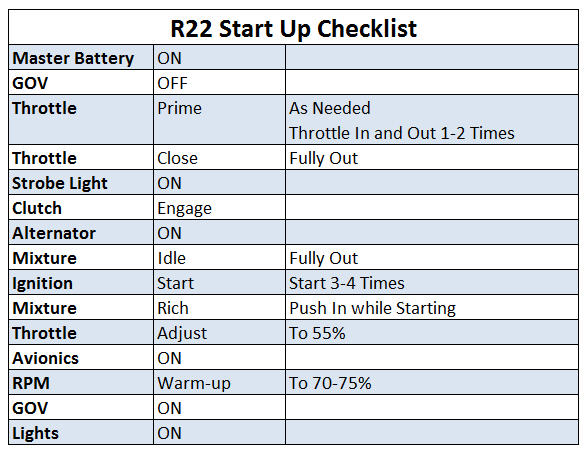 Continue reading
Tips
360: Skipping Orbx Online Verification

Besides backing up my system images, I also make individual copies of important files on my computer regularly. Orbx addon registry is certainly one of them.
During installation, Orbx addons firstly performs an online-store verification and then creates a corresponding entry containing the serial of the product in the registry. With this information in place, the verification process is no longer needed, no matter how many times the product is again reinstalled onto the same computer.
This principle similarly helps in my recent system break-down incidence. Continue reading
357: Get Rid of the GeForce Experience
Updating driver regularly is a good practice, especially when it comes to video cards. However, doing so may risk us to install unwanted features that come with the driver as well. One of these is the Nvidia GeForce Experience.
GeForce Experience is Nvidia’s proprietary software in which separate applications, including Game Optimization, GameStream, ShadowPlay, Battery Boost and LED Visualizer are included. They are designed to automatically adjust the configuration of the GeForce graphics card based on the games we play.
It sounds good, doesn’t it?
348: My Fix for Windows 10 Upgrade
In the past ten months, I had failed to upgrade my older computer to Windows 10 numerous times. Various google-searched solutions were tried but futile in the end. The upgrade process always stopped at 20- or 70-somethings and reverted  back to the original OS. It was quite frustrating.
Last weekend, I was finally successful to upgrade the computer to Windows 10. The optical drive was the key! Continue reading
347: Shade for P3D ?
From time to time I receive questions from simmers asking if my ShadeShifter utility is compatible with P3D, while they are requesting for the download link.
The answer is “No” because “Shade for FSX” by Mogwaisoft is written specifically for FSX as its name indicates. And since my ShadeShifter utility was built upon it, it therefore doesn’t apply to the P3D platform indeed.
However, as my Post 107 mentioned, “Shade for FSX” is basically a utility that modifies the sky texture in FSX to achieve a different look and feel. And since P3D is in general an upgraded version of FSX, we could therefore copy and paste the “sky textures” modified by “Shade for FSX” into P3D. That will achieve the same result, although this approach lacks the user-friendly interface the utility originally provides.
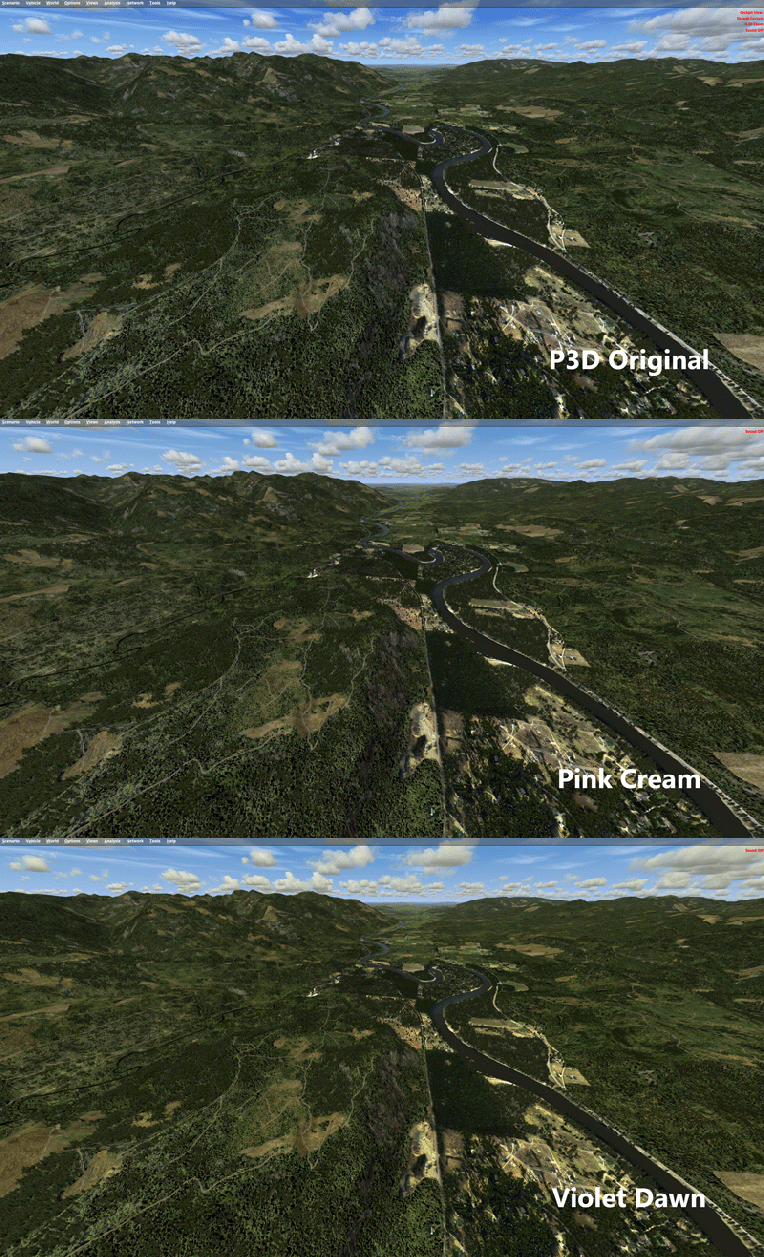
Perhaps some of you have been doing it already. For others who have both FSX and P3D and the “Shade for FSX” utility and don’t know how to do it, here’s the instruction: Continue reading
345: Saitek Panels Can be Networked, Too
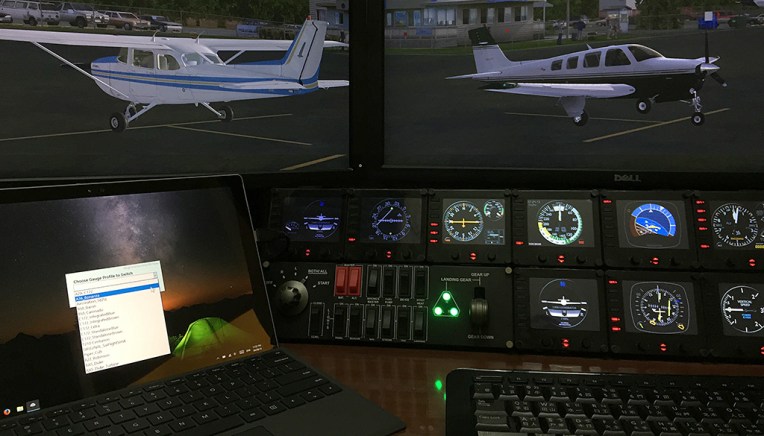
Stefano Cancelli in Canada recently reported to me that the Saitek Pro Flight Radio Panel, Multi Panel and Switch Panel actually can be run on a networked computer, exactly like what the Flight Instrument Panel (FIP) does.
“I discovered it quite by accident.”
Stef said he was not aware that the panels were still connected to his network computer after reverting SPAD.neXt to Saitek drivers due to some issues. When he started a flight, he then realized that the networked panels were all working perfectly controlling radios, auto pilot, switches, and everything on the main fsx computer.
“This was a big surprise to me since I do not believe it is ever mentioned in Saitek’s documentation,” he said.
Stef came to me and ask me if I could help confirm his finding. Continue reading
344: Don’t Go Changing, to Try Reverse Me

As mentioned in my last post, although Jack’s suggestion of reversing the order of the gauges in the SaiFlightSimX.xml list renders a more intuitive and logical user-button reaction, the “solution” still isn’t perfect. Because the opposite associations of the “Up Button – Down on the List” and “Down Button – Up on the List” or vice versa basically have not changed.
Thanks to Alexey, who is the author of FIP Toolkit & FIP Customizer, I am now able to swap the functions of the Up/Down button “physically”. Meaning that when I press the “Up Button” on the FIP, it really means “Going Up” the gauge in the SaiFlightSimX.xml list, and when I press the “Down Button“, it really means “Going Down” the list.
Alexey said that the two buttons cannot be reprogrammed because they are not handled by the device’s SDK. However, we could swap the button masks of these two buttons to achieve the same result.
Followings are the steps. NOTE that you are highly advised to make a system backup before you proceed. Continue reading
343: Reversing Orders of the Gauges
Over the years, I’ve been putting the order of my gauges in the SaiFlightSimX.xml file according to the start up order of the FIPs as shown below.
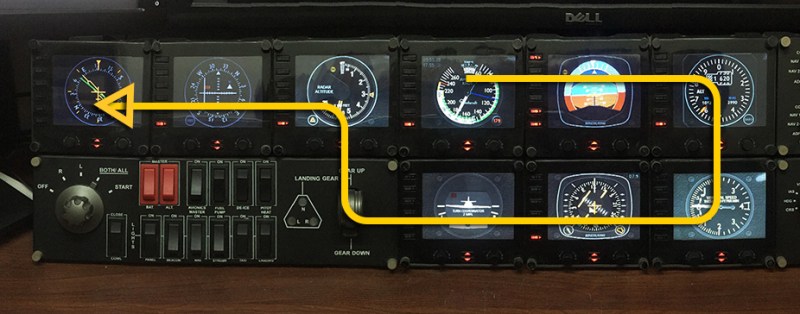
I know by “pressing the UP button” on the FIP means switching to the “NEXT” gauge (Down one on the SaiFlightSimX.xml list order), and “pressing the DOWN button” means switching to the “PREVIOUS” gauge (Up one on the list order).
With these “UP button – Down One / DOWN button – Up One” arrangement, I can’t help falling into the confusion of Continue reading
331: 30,000-Something Invalid Paths
It is commonly known that every piece of software after removed from the computer could have left some invalid registries behind. But I was shocked to find out that the total number of invalid path registries left by Prepar3D v3.0 could have crazily accumulated to 34,423 entries.
Unbelievable but it is real. It took me nearly three hours to clean them up from my computer earlier this evening.
If you have updated to P3D v3.1 recently (no matter it was by patches or by re-installation), you’d better run a thorough system check. Maintaining a clean and error-free system as always is critical to keep the flight simulation, both FSX and P3D, to perform in best condition.
 FS Times