
231: AffinityMask for P3D V2

Although I said that FSX is still my preferred simulator platform, it doesn’t mean that I am totally giving up on P3D V2.   The two main issues that stop me from swtiching to this highly expected simulator are third-party addon compatibility and lagging FIP gauges.

For the first one, I couldn’t do anything but to wait for updates and fixes from either Lockheed Martin or related developers or we users ourselves.  For the second, after weeks of on-and-off trials and errors, I am glad to say that the lagging issue my FIPs encountered has been generally reduced to a minimum level that is now fully playable under P3D environment.

Continue reading

228: FSX with Windows 8.1

FSX is prone to crash under Windows 8 — a lot of people reported that on the Internet, even though there are still many positive feedbacks about the combination.  Windows8Frankly speaking, I was really a bit nervous about my bold decision of upgrading to the new OS.  And I was prepared to encounter all sorts of unexpected FSX problems plus the notorious crash-to-desktop (CTD) issue.

To my surprise, in the first few days after FSX with Acceleration was installed under Windows 8.1 on my new computer, the simulator not only performed smoothly without the need of any tweaks but also ran sturdily.   It didn’t crash at all, not even once during those days, UNTIL … Continue reading

224: Turning Off the FIP – Black Friday

TechLevel01W
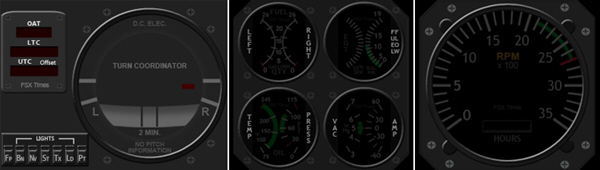
Due to various unexpected situations, the Turning Off the FIP series were stopped for over a month.   To compensate for the interruption, I have put the OFF Masks for the remaining RPM, Integrated Fuel Gauges, and even the new Turn Coordinator into a single RAR file on this Black Friday for existing users to download by clicking the image below.  The OFF masks for the earlier Altimeter, Vertical Indicator and Airspeed Indicator are also included.  Just put the files in corresponding folders will do.

TurnOFF_FIP_MISC

Continue reading

223: Useful Tips on Multiple FIP Usage

In addition to the stunning 18 FIP cockpit photos Andrew Crowhurst shared with us earlier, he also summarized his experience about setting up multiple FIPs as follows.   (BTW: some of you may have not noticed that the cockpit photos from Andrew posted yesterday have just been replaced by newer, higher resolution updates.)

Despite one of his recommended suggestions on how to link multiple hubs for FIPs which requires a little DIY technical knowledge and skill,  Andrew’s tips are pretty straightforward and should answer many questions FIP users generally have in mind.

1. Should I connect all my FIPs directly to my PC?

I found that Continue reading

220: Turning Off the FIP#3 – AS Indicator

TechLevel01W
(Updated on: 24 October 2013)  This is part three of the Turning Off the FIP series. This time is the AirSpeed Indicator.

C172_AS_OFF.bmp==========
AAA
Similarly, save the image on the right to the \1024 folder where you keep the VS indicator (e.g. C:\Program Files (x86)\Saitek\DirectOutput\Gauges\1024) via the link below:  https://dl.dropboxusercontent.com/u/25018674/Gauges-C172/C172_Gauges_130815_OFF/C172_AS_OFF.bmp

==========
AAA
Remember that the image must be saved as it is in BMP format — C172_ALT_OFF.bmp Continue reading

219: Turning Off the FIP#2 – Altimeter

TechLevel01W
(Updated on: 24 October 2013)  This is part two of the Turning Off the FIP series.   This time is the Altimeter.

C172_ALT_OFF.bmp==========
AAA
Similarly, save the image on the right to the \1024 folder where you keep the VS indicator (e.g. C:\Program Files (x86)\Saitek\DirectOutput\Gauges\1024) via the link below: https://dl.dropboxusercontent.com/u/25018674/Gauges-C172/C172_Gauges_130815_OFF/C172_ALT_OFF.bmp

==========
AAA
Remember that the image must be saved as it is in BMP format — C172_ALT_OFF.bmp Continue reading

218: Turning Off the FIP#1 – VS Indicator

TechLevel01W
(Updated on: 24 October 2013 Just recalled reading a question somewhere before — “Is turning off the Fligth Instrument Panel (FIP) possible?”

Yes, it’s possible by unplugging it from the USB socket.

I know it is not what the question really asks for.   But truly, when the FIP is connected with electricity powered, there isn’t “A Switch” that one can turn off the FIP, unfortunately.

Well, for those who are using my C172 gauges, here’s an alternative:

Continue reading

217: Align TrackIR Quickly

Have tried a few wireless head tracking software, NaturalPoint’s TrackIR + TrackClip Pro is still my choice so far.  Following is the method I find very effective when aligning the device at startup.  Of course associated software must be activated first.

AAA
Place the TrackIR receiver on top of the monitor about 1/8 in length from the left edge.

TrackIRP01 Continue reading

215: Turn Off FIP Buttons

TechLevel01W
Received a question yesterday asking how to remove the text of the six programmable buttons on the left hand side of the Flight Instrument Panel (FIP) so that one could make use of the whole 320×240 area on the device.

It is easy to achieve by just removing the content of the Name command inside the LogiFlightSimX.xml file under C:\Program Files (x86)\Logitech\FSX Plugin directory as shown below.
(For systems using the older drivers from Saitek, the file is called SaiFlightSimX.xml and it is located under C:\Program Files (x86)\Saitek.)

FIP Botton 01

Continue reading

