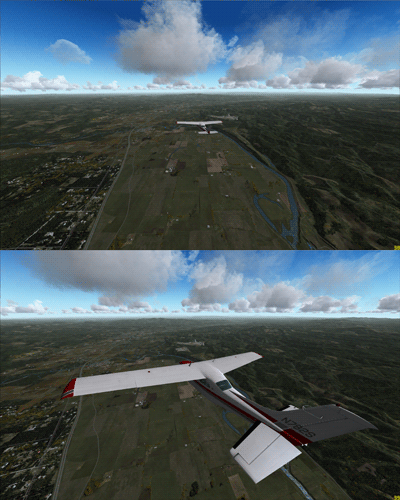
128: The Little Secret of Day & Night

Ever wonder what the FTX Day Night Switcher does to your system?  Here’s the detail.

The Miscelleneous_lib_orbx.bgl under X:\Microsoft Flight Simulator X\Scenery\Global\scenery directory is the file controlling some of the lights in FTX scenery.   The switcher reinstalls two versions of it in the ON and OFF folders under X:\Microsoft Flight Simulator X\ORBX\Scripts\Lights directory.

The OFF folder contains the DAY version (with some of the lights removed), where the ON folder holds the NIGHT (original full) version.  The switcher just functions to copy the full or lighter version (on or off) to replace the one in the Global Scenery directory.

Regarding the hype of “doubling your FPS”,  I don’t have the luck to reach that level but just a marginal improvement.    Developer of FTX says,  “… not seeing a big change may be due to your already optimized settings or possibly GPU AA settings, frame limiter or even a FSX.cfg tweak.”     Anyway, still worth a shot.

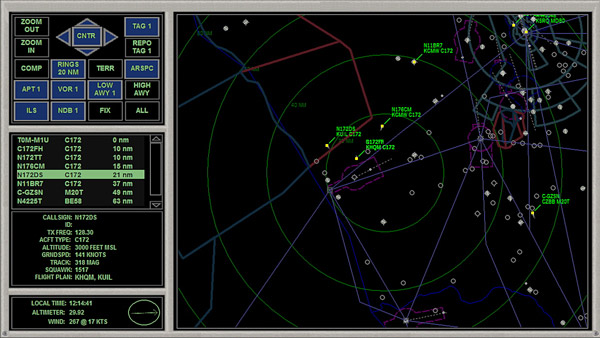
127: Put the Tower Radar on the Plane

Each aircraft in FSX can be equipped up to 9 different panels, and each of these panels can be called up by pressing the [SHIFT] plus a number key from 1 to 9.   However, only a few aircrafts in FSX are actually equipped with all 9 panels.   Most aircrafts use less than five.

The following tweak adds the radar panel found in control tower to virtually any aircraft.

Don’t remember where I found this tweak in the first place (credit should be given to the one who shared this).    It is an interesting and useful one and quite easy to implement.    Furthermore, I had it simplified.

Here’s how to add the radar to the Cessna 172 as an example.    Same procedures apply to all other planes:

Continue reading

124: Break the 10-Day Shade Cycle Limit

SHADE for FSX is built on the 10-day cycle of FSX.   Therefore, up to 10 different SHADE presets can be saved via the program’s GUI utility (Shade_gui.exe).

Actually, it is possible to crack the 10-day limit and extend the cycle to cover all days in a month.    And theoretically, it is even possible to use a different preset every day throughout the year and beyond, despite of the impracticality of the idea.

The concept of this tweak is pretty simple — when SHADE for FSX is executed, it will load the presets from the settings.ini created by Shade-gui.exe.   Therefore, if one can:

  • Prepare three different settings.ini each containing 10 different presets (totalling 30 presets)
  • Load them one after the other in every 10 days

Then, each day in a month can associate with a unique preset stored on these three settings.ini.

The tricky part is how to fully automate the swapping process of these three ini files according to a predefined condition without human intervention.

Here’s what I did:

Continue reading

123: Disable Unintended Auto-Pilot Wing Leveler

Some aircrafts in FSX, both default and add-on (such as T210), will turn on Wing Leveler automatically when Altitude Hold is activated, meaning that manual control of the aileron is also disabled.

To regain the control of it, one can press Ctrl-V on the keyboard to disable (or enable) the function.

Better still, one can modify the aircraft.cfg files of such aircrafts, and add the following command lines under the [autopilot] section, so that Wing Leveler function could be independent from Altitude Hold permanently.

[autopilot]
default_bank_mode=0
default_pitch_mode=0

Assigning “1” to both values will reactivate the associated Wing Leveler function with Altitude Holder under auto-pilot mode.

121: Giving Grass a New Definition

I have Real Environment Xtreme (REX) installed for a long time but I didn’t aware that its freeware could bring additional enhancements to FSX until recently.   I thought they were included in the package.

The Enhanced Grass Texture freeware instantly upgrades the grass resolution to a new height.  (Edit: The company has changed its rule.  To download, you must register and login to their public forum.)

Installation is as easy as snapping fingers.   But DO REMEMBER to make a backup of the original grass texture file.   Moreover, it may have barely perceptible impact to the overall performance.

113: A Quick Fix to SHADE Darkness

As mentioned in Post 107, the one thing I particularly dislike SHADE for FSX is that all its available Presets will significantly dim the brightness of all scenes in FSX, especially in the early morning and late afternoon.

Although users can modify the Preset values via the program’s graphical user interface (Shade_gui.exe), the effects of changes are not intuitive and the results are to some extent depending on a time-consuming trial-and-error process.

Indeed, there’s not much one can do to speed up the process of getting an ideal result from color and shadow changes.   But for the “too dark” issue, followings are what I did for a quick fix, from which I further finetune the color and shadow of shade for my own preferences.

Continue reading

109: An Alternative to Framerate Display

Pressing Shift-Z in FSX can display a bunch of information regarding the current flight session, such as framerate, position, heading, airspeed, etc.   However, there is no way to change the position, font size and color of the text of the Shift-Z command itself.

ATI Tray Tools by Ray Adams is a good alternative and it can display information about the computer status as well.   Actually, ATI Tray Tools is a powerful Radeon card utility that offers extra advanced video card features beyond the official Catalyst Control Center.
Continue reading

104: Kill UTX in Orbx Regions

Lately, I’ve been helping scenery checking for Return to Misty Moorings’ coming Cambria Icefield Research Project (CIRP).

One team member Guy Maricich (known as Spud) commented the anomalies I reported as follows:

Due to time differences, installation differences and ‘the eye of the beholder’ differences there will always be anomalies showing.   Tom for instance, seems to have some objects that are floating more so than others do.   I suspect either he has addon MESH or something else that is causing him to see things a wee bit different than most of the rest of us. Continue reading

103: fsx.CFG – SmallPartRejectRadius

Small objects with 1 pixel in size far in distance are normally hidden by FSX, until the aircraft is approaching close enough.   By expanding small objects with larger pixels to this hidden group could bring noticeable performance improvement.

SmallPartRejectRadius allows the specifying of pixel size of small objects to be included to the list.

This function does not appear in fsx.CFG by default.   To use the function, Continue reading