83: Some Good Tutorial Sites

Good tutorial sites touching various subjects and features related to FSX.

Angle of Attack
Aviator 90
Chris Palmer created a comprehensive 90-day flight simming training course to simmers for free. It is particularly useful to beginners and all who want to polish up their aviating skills.

Continue reading

73: fsx.CFG – Vertical Sync

When vertical synchronization (refresh) of display is not set properly, it is very likely that some sorts of screen-shearing problem will be introduced in FSX.

This screen-shearing issue can be easily identified when the view is turning to the left or turning to the right quickly, especially in the virtual cockpit view.  It seems that the upper half or the lower half of the screen is lagging behind to the other.

Continue reading

72: Add Realism to ATC Communications

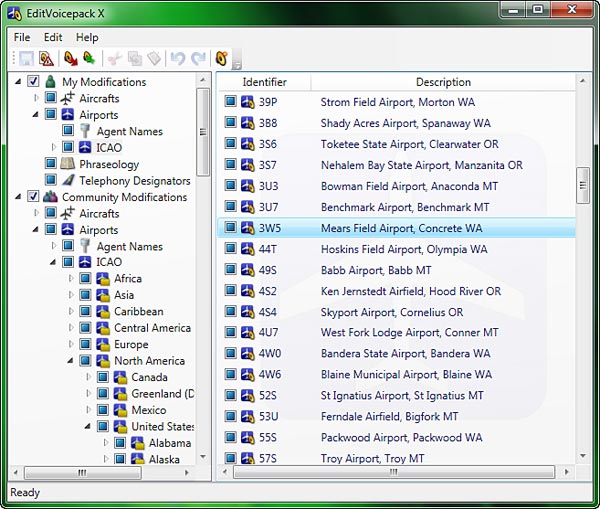
EditVoicepack is a simple tool that helps realize a more realistic ATC communication environment and allows to change the phraseology as well as airline callsigns, airports and aircraft types in FSX.

Current version available for FSX is 4.0.7.0 at the time of this post.  Customized EditVoicepack files could be found in AVSim and FlightSim file libraries.

Continue reading

71: Calling Out Altitude

Adding Altitude Callout for decending aircrafts in FSX is as simple as calling out 1000, 500, 300, 100, 50, 40, 30, 20, 10, …

STEP 1:  FSUIPC    (If FSUIPC is already installed, skip to STEP 2)

a) Download FSUIPC4 from schiratti.com

b) Run the FSUIPC4 installer

c) No need to register FSUIPC; just press ESC to finish the installation  Continue reading

67: fsx.CFG – LOD_RADIUS

LOD_RADIUS under [TERRAIN] determines the size of the coverage area to be refreshed around the aircraft.   It has a default value of 4.5.

[TERRAIN]
LOD_RADIUS=4.500000

However, a number of other aspects are also influenced by this value in addition to refreshing the coverage: Continue reading

66: Give the Aircraft a Little Push

Purchased a few third-party aircrafts but the default C172 is still my favorite.  It will be perfect if the plane can be more powerful and fly a little bit faster like the Skylane 182.

Here’s how I “installed” the 182’s six-cylinder, 235hp engine to my C172:

Continue reading

64: Adding Network Link in Google Earth

I have used jpeg images and Google Maps to plot geographical locations of my scenery add-ons in my posts.  However, the result is far from expectation, not to mention a lot of time and efforts were spent on converting the data into appropriate Google Maps format and jpegs.

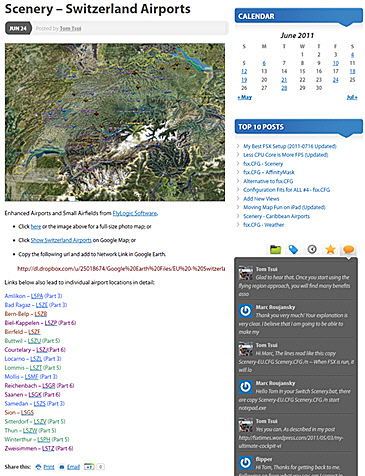
Starting from the Scenery – Switzerland Airports and Scenery – Caribbean Airports posts, a url of the corresponding Google Earth file will be provided in all Scenery posts (older posts will be updated gradually).

By adding the url to Google Earth via Network Link, not only the map-display result is matching of what I am having, the scenery data can also be updated automatically once the master file is revised.

Continue reading

57: Safest Approach to Install Addons

I normally pay extra attention when adding addons to my system because the performance of FSX sometimes is so allergic to tinny tiny stuff added to it.

No matter the addon is a scenery or an airplane, we mostly don’t have sufficient prior informantion about what will be added to, and in particular what will be overwritten from the system.

To  minimize the risk of uncertainty, I normally take the dummyproof approach described below to “quarantine” the content of the new addon in the first place.

The logic behind is: Continue reading

56: Remove Standard AI Traffic

My system has Just Flight’s Traffic X and a few other AI traffic addons installed.   They together brought a lot of AI aircrafts and traffics, which makes the default ones redundant.

Naughty Fleet of Airplanes

To reduce overlapping and enhance system performance, the TrafficAircraft.bgl under X:\Microsoft Flight Simulator X\Scenery\World\Scenery was moved to a backup folder so that no standard AI traffic is loaded.

To restore, just putting back the file to the original folder will do.